
Replacement parts,
evaluated.
When a part goes obsolete, Parts AI drafts the item equivalency evaluation for its replacement, one step at a time, and stops for the engineer at every decision. It also looks for where to source a part, turns manufacturer data sheets into cited feature sheets, and makes your parts catalog searchable by what a part is.
- Your catalog, your data sheets
- The engineer approves every step
- Single-tenant, hosted by Nuclearn
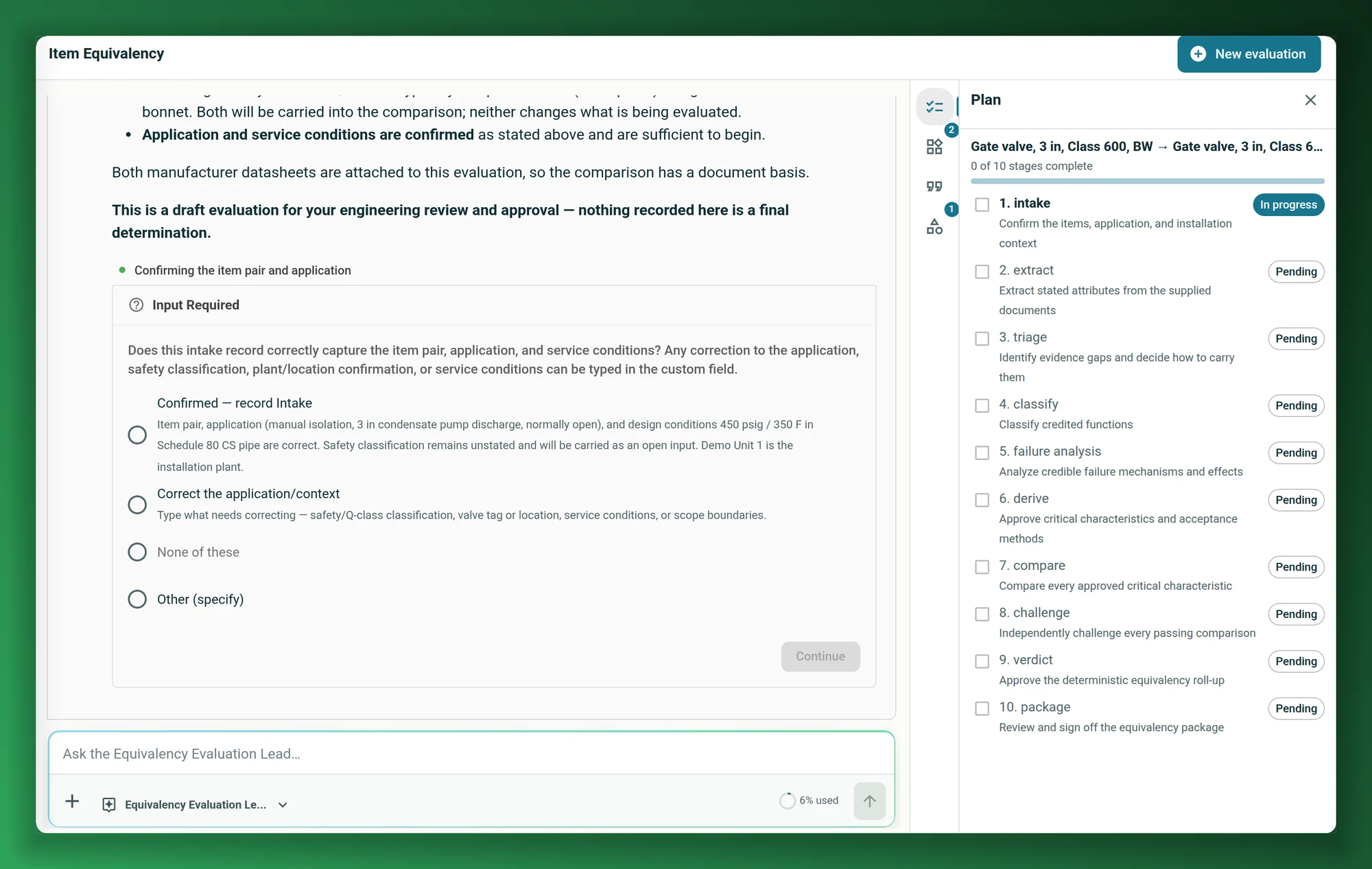
Screenshots on this page show fictional demo parts, manufacturers and data sheets, as they appear in the Nuclearn platform today.
- Backed by NuclearnAI software built for nuclear plants since 2021
- Over 70 facilitiesNuclearn products serve sites in North America and the U.K.
- ISO/IEC 27001:2022Certified information security management
When a part is gone, the work starts.
An obsolete part means finding a replacement, comparing it characteristic by characteristic, documenting why it's acceptable, and finding someone who can supply it. Parts AI drafts that work from your catalog and the manufacturers' documents, and the engineer makes each call.
Evaluate a replacement part
Pick the installed part and the candidate, attach their data sheets and describe the application. Parts AI works through the item equivalency evaluation and drafts the package for sign-off.
See equivalency → Buyers and procurementFind where to source it
Parts AI checks your catalog, then looks for the OEM part, refurbished or rebuilt units, reverse-engineered or dedicated equivalents, an upgrade and surplus, with a link for every source.
See sourcing → Engineering and catalogingTurn a data sheet into a feature sheet
Upload a manufacturer's data sheet and Parts AI lists the part's specifications, each tied to where it came from. Edit the sheet, then save it to the catalog as a part.
See feature sheets → Planners and storeroomsSearch the catalog by what a part is
Search by name, description, manufacturer or material number, filter by group and type, or describe the part in plain words and let Parts AI find the closest matches.
See the catalog → Catalog ownersStart from the catalog you have
Upload parts from Excel or CSV. Extra columns become features, and Parts AI drafts a feature sheet for each part from its description.
See the catalog → IT and securityInside the Nuclearn platform
The same sign-in, documents and permissions as the rest of the platform, licensed as one module that includes equivalency and sourcing.
See security →An equivalency evaluation is careful, slow work.
Confirm what's installed and where. Pull every stated attribute out of two sets of vendor documents. Decide which functions matter, how the part can fail, and which characteristics have to match. Compare each one, chase the evidence that's missing, and write it up so someone can sign it.
Parts AI does the reading, extracting and drafting. The engineer approves each step and signs the package.
Intake, readiness, functions, failure mechanisms, critical characteristics, comparison, the verdict and the package each stop for a person. Extraction runs on its own, and so does the challenge, which double-checks every passing comparison.
From two parts to a package you can sign
Three steps, with the engineer deciding at each hold point.
Pick the two parts
Choose the installed part and the candidate from your catalog, attach their data sheets and test reports, and pick the datasets to search for design basis, qualification records and earlier evaluations.
Work through the evaluation
Parts AI extracts each document's attributes, lists the gaps, classifies functions, analyses failure mechanisms and compares every critical characteristic. You approve or correct each step before it moves on.
Sign off the package
The verdict is rolled up from the comparison rows you approved, and the equivalency package is generated as a Word document from the recorded results, ready for review and sign-off.
An equivalency evaluation that waits for the engineer.
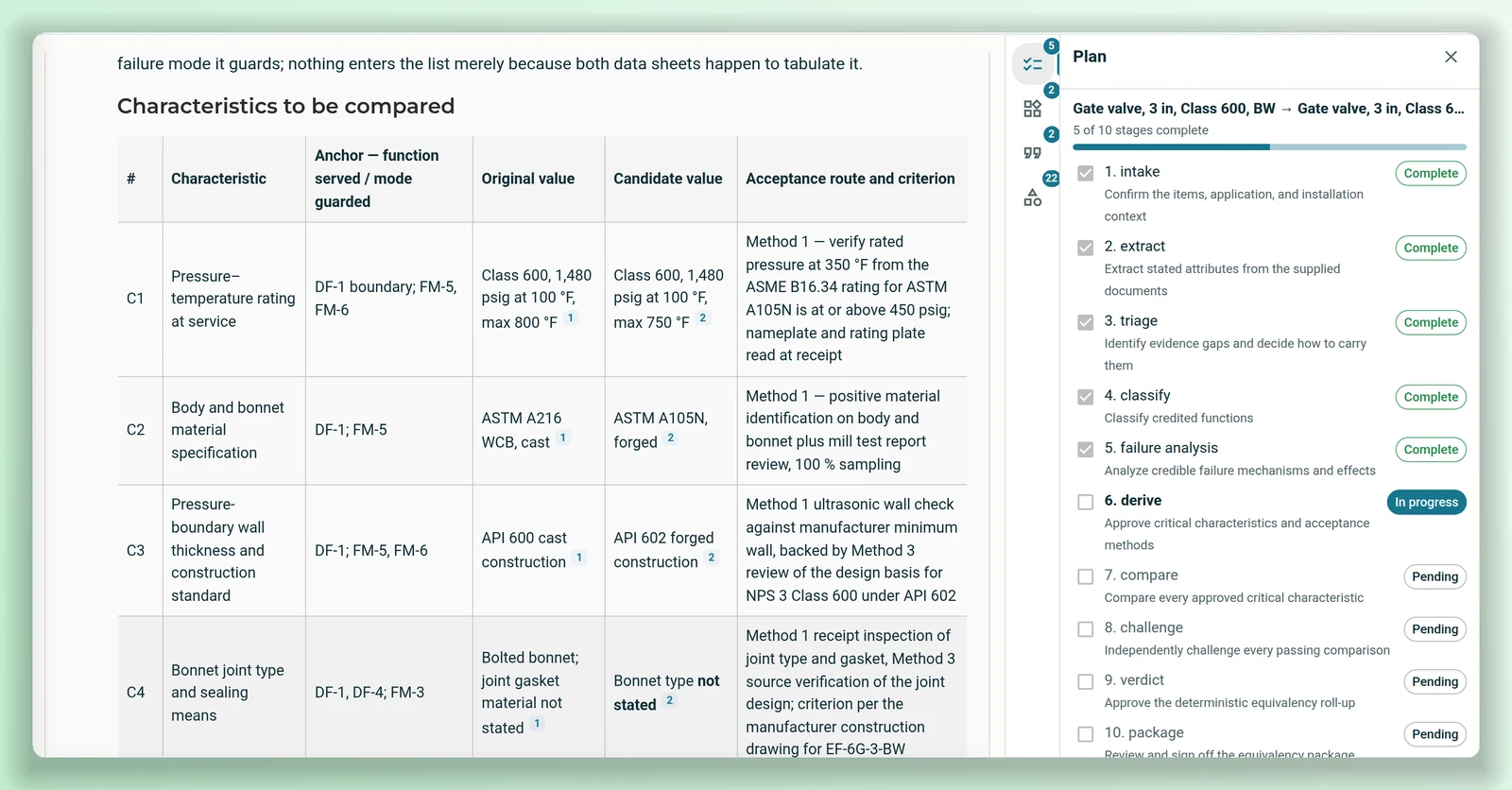
Each evaluation follows the same ten stages, shown as a plan beside the chat. Every critical characteristic is tied to the function it serves or the failure it guards against, with both parts' values cited to their data sheets and a method for accepting it. At every hold point Parts AI sets out what it found and asks the engineer to confirm or correct it before it goes on.
- Every critical characteristic rated identical, equivalent, different, not applicable or not verified, with the evidence behind it.
- A second agent challenges every passing row; a refuted row goes back for comparison.
- The verdict is computed from the recorded rows, not judged by the model.
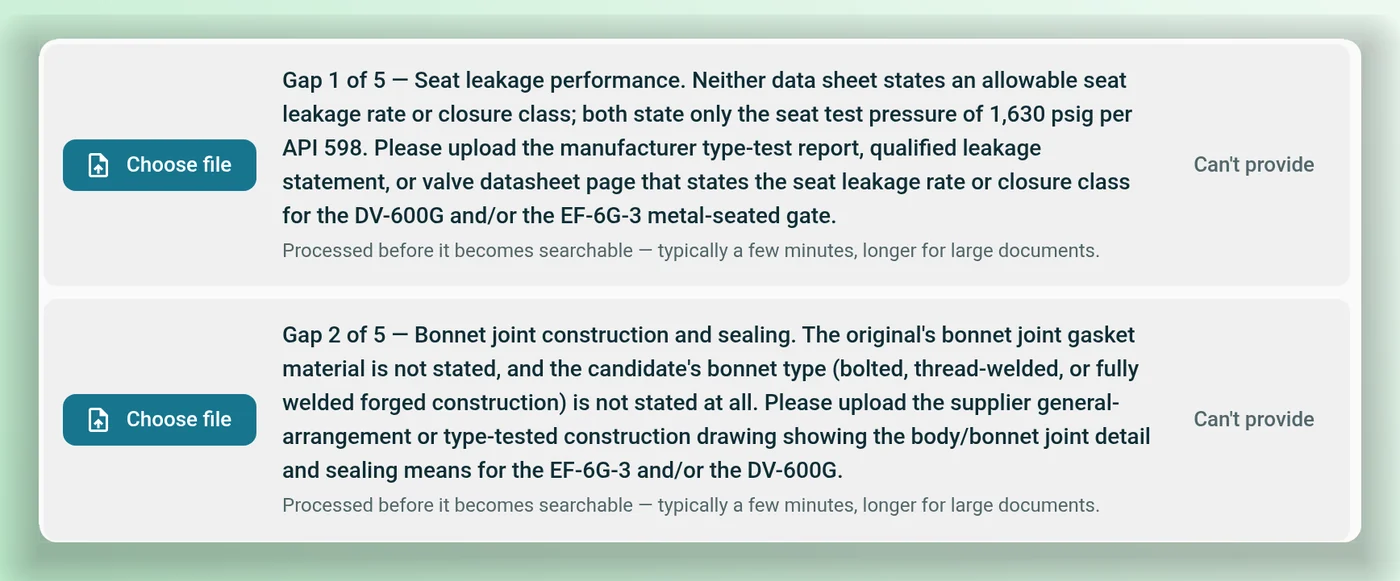
Missing evidence is named, not guessed.
Before the comparison, Parts AI reviews what the documents can and can't answer. Each gap says what's missing and which document would close it, such as a type-test report or a dimensioned drawing.
- Upload the document, or carry the gap as an open item.
- Rows that rest on a gap are rated not verified until the evidence arrives.
- Open items stay in the record and the package.
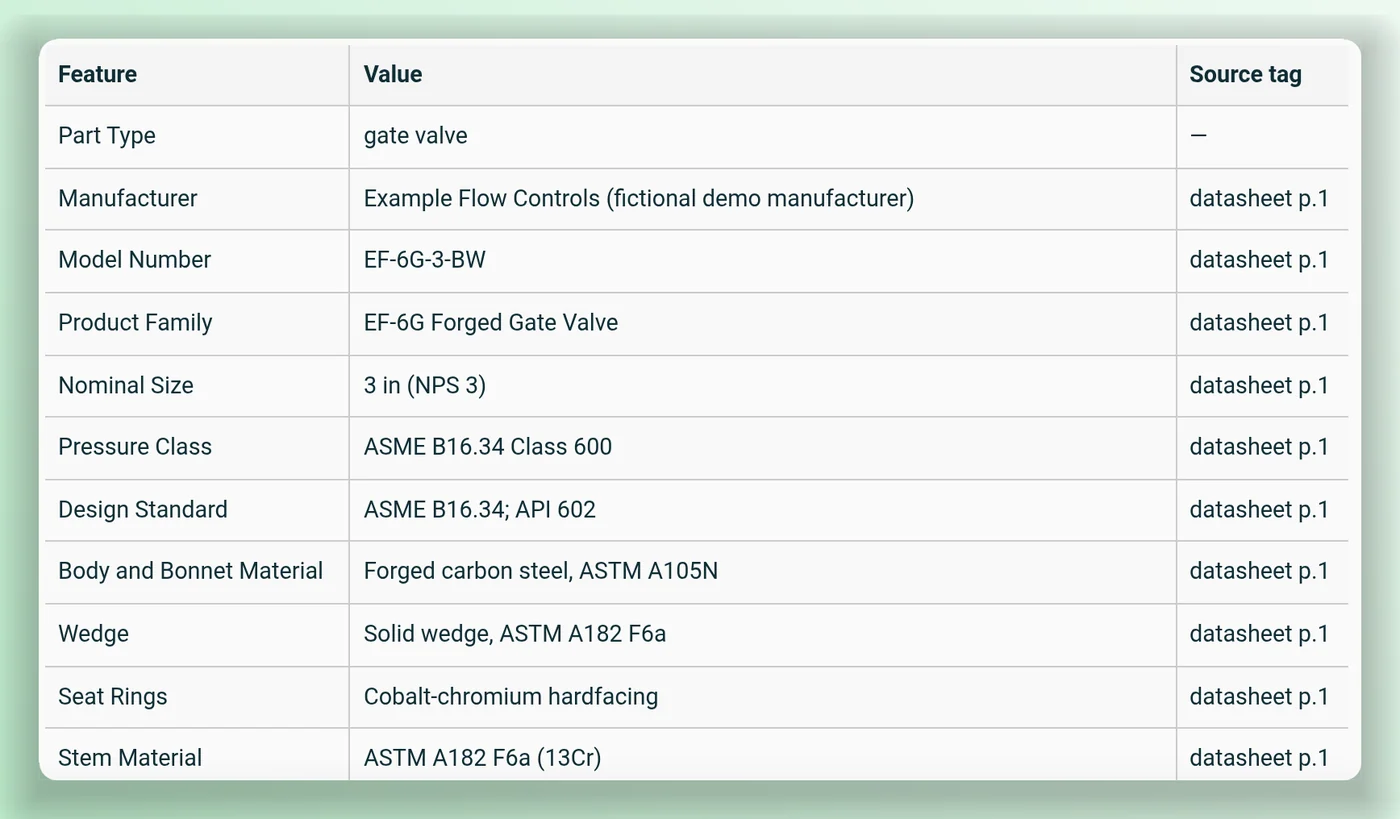
From a data sheet to a feature sheet.
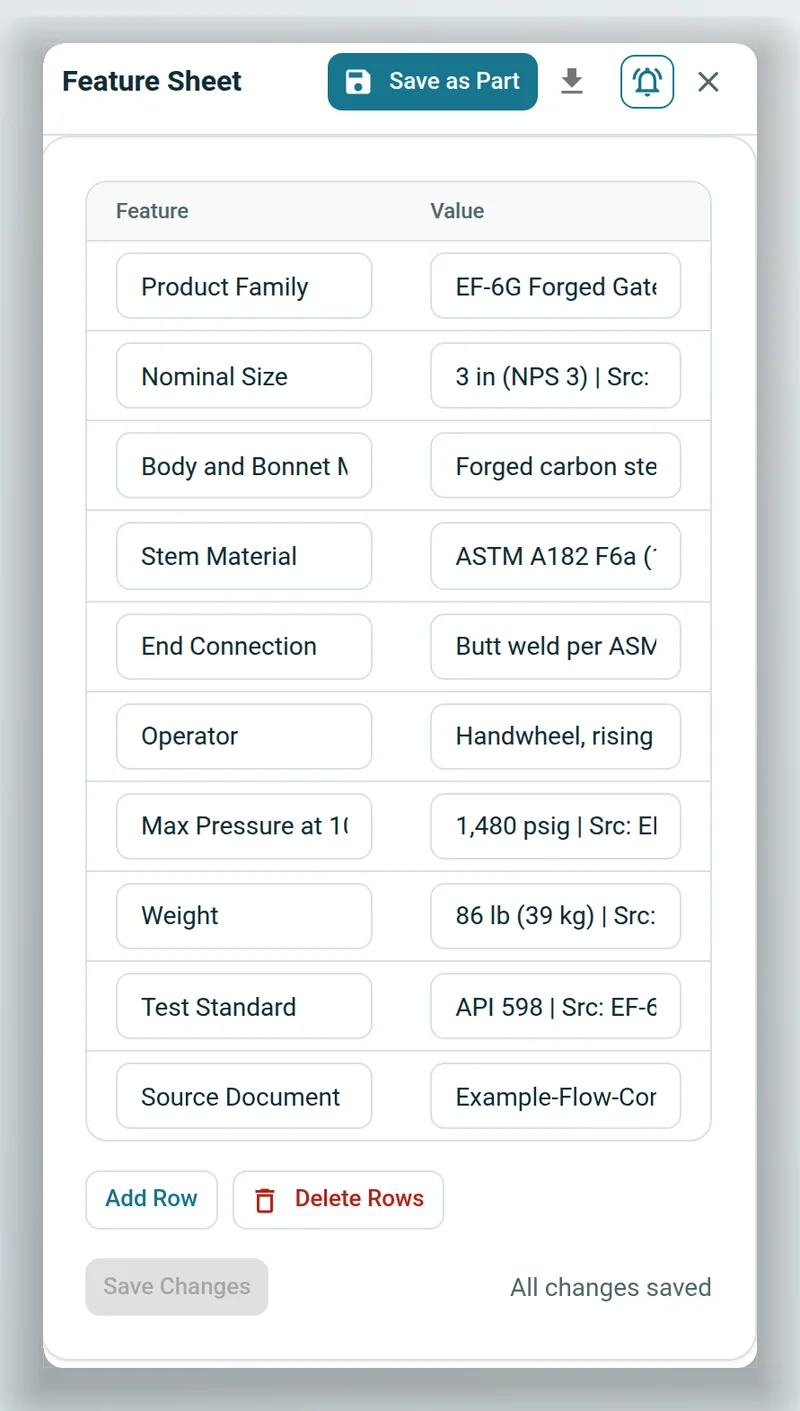
Upload a manufacturer's data sheet and ask Parts AI for the part's feature sheet. It reads the document, lists each specification with its value and where it came from, and fills in the feature sheet beside the chat.
- Each value tied to the document and page it came from.
- Edit, add or delete rows before you save.
- Save the sheet to the catalog as a part.
A catalog you can search by what a part is.
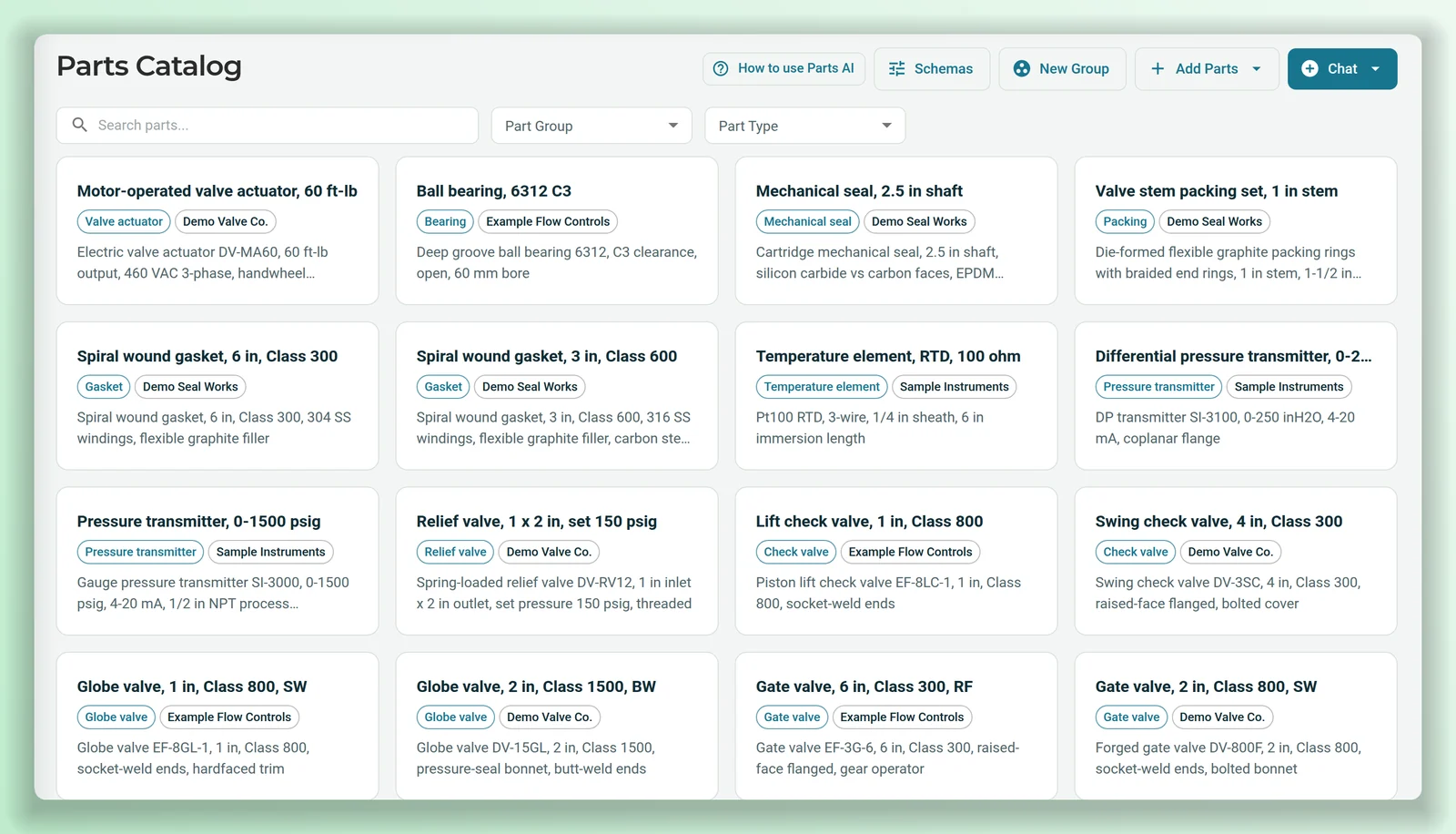
Parts come in from Excel or CSV, or one at a time, with their type, manufacturer, material number and features. Search the catalog by any of them, filter by group and type, or describe what you need and let Parts AI find the closest parts.
- Upload up to 10,000 parts per file; extra columns become features.
- Define a schema for a part type and sizes and ratings compare across units: 3 in matches 76.2 mm.
- Ask in plain words in a search chat; matching parts are pinned beside it.
Built around how a replacement gets approved
Where to source it, in order
A sourcing chat checks your catalog, then works through the OEM, refurbished units, rebuild or repair, reverse-engineered or commercial-grade dedicated equivalents, an upgrade and surplus. Each source gets a link and is marked nuclear-qualified, commercial (needs dedication) or unknown. It says when a non-OEM source needs dedication or an equivalency evaluation.
A Word package
The equivalency package is generated from the recorded results as a Word document for review and sign-off.
An agent for each role
Choose the agents that lead the evaluation, extract documents, compare characteristics, challenge results and write the package.
Your reference sets
Point an evaluation at design basis, qualification records and earlier evaluations to search.
Runs kept together
Every evaluation keeps its parts, plan, sources and package, listed on a runs page.
Schemas by part type
Define the features a part type should have, with data types, units and allowed values, and subtypes that inherit them. Applying a schema brings existing parts of that type into line, so they can be filtered by those features.
In Nuclearn's datacenter.
Scoped to each person.
Parts AI runs on the Nuclearn platform, in Nuclearn's own datacenter on Nuclearn's hardware, with the same sign-in, documents and permissions.
Single-tenant, hosted by Nuclearn
Each plant gets its own instance, hosted by Nuclearn in our own datacenter on our own hardware. Azure Government or your own servers on request.
Platform sign-in
The same single sign-on and roles as the rest of the Nuclearn platform.
Access checked
Each person sees their own evaluations, and an evaluation only uses documents from datasets that person can open. The parts catalog is shared across the instance.
One licence module
Parts AI is licensed as one module, and it includes item equivalency and sourcing.
Built for 10 CFR Part 810
How Parts AI is hosted, operated and supported is set up for 10 CFR Part 810 export controls.
A certified company
Nuclearn is ISO/IEC 27001:2022 certified.
What it is not
Parts AI drafts and finds; it doesn't approve a replacement or qualify a supplier. The engineer dispositions every difference and signs the package, and sourcing results are information to evaluate, not a purchase or qualification decision.
Questions procurement and engineering teams ask
What does an equivalency evaluation start from?
Two parts from your catalog, the installed one and the candidate, plus their source documents (PDF, Word or text) and a description of the application. You can also pick datasets to search for design basis, qualification records and earlier evaluations.
Does it decide whether a replacement is acceptable?
No. It rates each critical characteristic with its evidence and rolls up a verdict from the rows you approved. The engineer dispositions any differences, approves the verdict and signs off the package.
What happens when a document is missing?
Parts AI names the gap and the document that would close it. Upload it, or carry the gap as an open item; rows that depend on it are rated not verified.
Where does sourcing look?
Your Parts AI catalog, then the open web: the OEM, refurbished and rebuilt units, reverse-engineered or dedicated equivalents, upgrades and surplus. Every vendor, part number and price it reports links to its source, and it flags prices and listings that may be out of date.
Can we load our existing catalog?
Yes. Upload an Excel or CSV file with a name column and, optionally, material number, part type, manufacturer and description. Any other column becomes a feature.
Is Parts AI part of AtomAssist?
Parts AI is its own product on the Nuclearn platform. It shares the platform's sign-in, documents and permissions.
Where does it run?
Each plant runs in its own single-tenant instance, hosted by Nuclearn in our own datacenter on our own hardware, with hosting, operations and support set up for 10 CFR Part 810 export controls. Azure Government or your own servers on request. People sign in through the Nuclearn platform.
See an equivalency evaluation from intake to sign-off.
We'll run a replacement through Parts AI with demo parts and data sheets: the hold points, the evidence gaps, the comparison and the package, and answer your IT team's questions about deployment and access.
- A live evaluation on demo parts
- How your catalog would come in
- Your questions on deployment, sign-in and access
Nuclearn Parts AI is backed by Nuclearn, whose products serve over 70 facilities in North America and the U.K.
Book a demo
Tell us a little about your site and we'll set up a time.
Thanks, we've got it.
We'll be in touch to set up a time. If it's urgent, email contact@nuclearn.ai.
Prefer email? contact@nuclearn.ai